
What actually happens to your accounts, photos, and passwords after you die? Apple and Google both have free built-in tools for this, Legacy Contact and Inactive Account Manager, but they only unlock stored data. Neither one lets you compose a message on purpose and have it arrive at the right moment, that’s a different problem, and it needs a different tool.
Somebody in your life has typed that exact question into a search bar at some point, usually late at night, after hearing about someone who left nothing behind but a locked phone. It’s one of the most common quiet worries people have, and almost nobody checks the real answer until it’s too late to act on it.

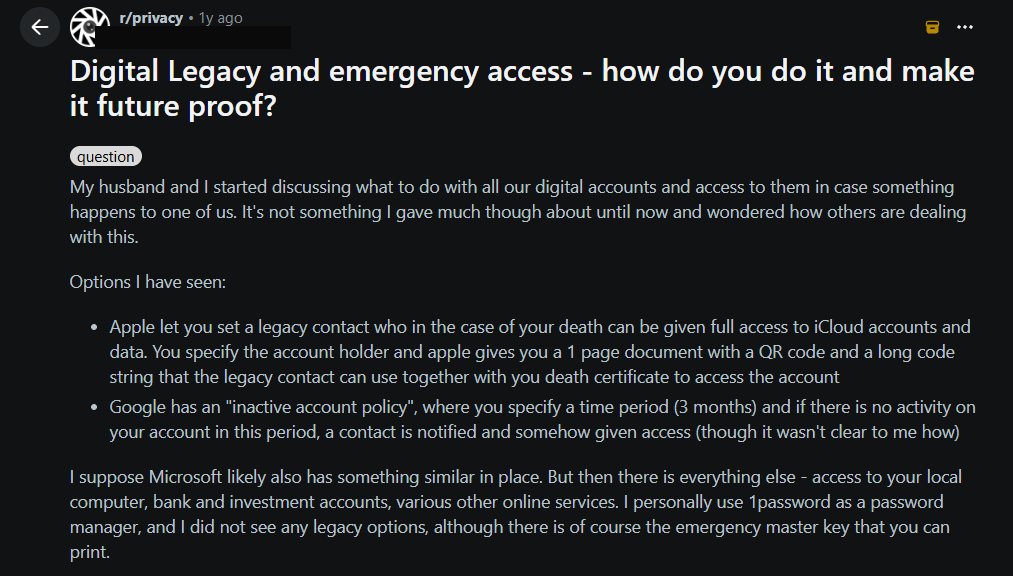
It’s a question real people are actually asking in public, not a hypothetical. In a r/privacy thread titled “Digital Legacy and emergency access, how do you do it and make it future proof?”, one person put it plainly: “My husband and I started discussing what to do with all our digital accounts and access to them in case something happens to one of us… I suppose Microsoft likely also has something similar in place. But then there is everything else, access to your local computer, bank and investment accounts, various other online services.” Dozens of replies work through exactly the same confusion, Apple Legacy Contact, Google’s inactive-account settings, and what a trusted person can actually receive once someone’s gone.
What Apple’s Legacy Contact Actually Gives Someone
Apple’s own support page describes a Legacy Contact as “the easiest, most secure way to give someone you trust access to the data stored in your Apple Account after your death.” Once set up, that person can reach your photos, messages, notes, files, and device backups.
Two real limits are worth knowing before you rely on it. First, Apple is explicit that a Legacy Contact “can’t access” anything purchased through your Apple Account, movies, music, books, subscriptions, and cannot reach anything stored in iCloud Keychain, which means saved passwords, payment details, and passkeys stay locked. Second, actually requesting access takes two things: the access key generated when you first set someone up, and a death certificate. Apple notes documentation requirements vary by country, which in practice can mean real delay during an already difficult week.
What Google’s Inactive Account Manager Actually Does
Google’s version works differently, and the difference matters. It doesn’t wait for proof of death at all. It watches for inactivity, no sign-ins, no Gmail activity, no Android check-ins, for a length of time you choose in advance.
Once that period passes, Google emails your chosen trusted contact. If you set it up to share data, they get a list of what you chose to share and a link to download it. If you only set it up to notify, they get a message with whatever words you wrote when you configured it, possibly years earlier. Google also requires a phone number for the trusted contact, specifically so only that person can complete the download.
The Real Gap Between Account Access and an Actual Message
Both tools solve a real problem, making sure someone you trust isn’t locked out of your digital life forever. Neither one was built to let you say something on purpose, in your own words, timed to land at the right moment.
An inactivity timer isn’t the same thing as choosing the day your child turns 18. A folder of old photos isn’t the same thing as a video recorded specifically for the day you didn’t expect to still be around to say it in person. Apple and Google are answering “how does my trusted person get in.” A Timeless message answers a different question: what do you actually want them to hear, and when.
Where Guardians Fit, Without Replacing Either Tool
A Guardian in MessageFuture isn’t a replacement for Apple’s Legacy Contact or Google’s Inactive Account Manager, and it isn’t trying to be. It exists for one specific job: releasing a Timeless message on your behalf if you’re ever unable to release it yourself. You choose who, and in the ordinary case, nothing happens at all, you release your own message yourself, whenever the right moment comes. If you’re not sure where to even begin deciding what to record, starting with one person and one specific thing is easier than trying to cover everything at once.
That’s a narrower tool than either account-recovery system, deliberately so. It doesn’t try to unlock your whole digital life. It makes sure one specific, already-composed message still arrives, even if you can’t be the one to send it. And if the person you’d normally trust with that job is ever unavailable themselves, a Guardian can hand that responsibility on to someone else rather than the message being stranded.
The Practical Version of This
If you haven’t set up a Legacy Contact or an Inactive Account Manager yet, that’s worth ten minutes on its own. Both are free, both are already built into accounts most people already have, and both solve a real, separate problem from anything MessageFuture does.
But neither one will ever hand your daughter a message recorded specifically for her wedding day, or let your son hear you answer a question he didn’t get to ask in time. That part has to be composed on purpose, by you, while you’re here to compose it. You can start with one message, for one person, it takes about five minutes.
Common Questions
Does naming a Guardian give them access to my messages right away? No. A Guardian can only release a Timeless message if you’re unable to release it yourself. They don’t see or control it under normal circumstances.
Can I use Apple’s Legacy Contact, Google’s Inactive Account Manager, and MessageFuture together? Yes. They solve different problems and don’t conflict with each other.
What happens if my named Guardian isn’t available when the moment comes? If delegation is enabled on that message, your Guardian can name someone else to carry the responsibility forward instead.
Some words are worth keeping for later.
MessageFuture lets you schedule letters, voice notes, and videos for the people you love, delivered exactly when the moment comes.