
A Timeless message has no delivery date. That is the whole point of it, a video for your kids “when I’m gone,” a letter for your partner “if something ever happens to me,” recorded for a moment nobody can put on a calendar. But a message with no date still needs someone who knows when the right moment has arrived. That is what a Guardian is for.
This is the practical walkthrough: what a Guardian actually does, how to assign one, and what each permission you grant them actually controls.
What a Guardian Actually Does
A Guardian is a trusted person you assign to a message, who can trigger delivery of a Timeless message when the life event it was meant for actually happens. Beyond triggering delivery, a Guardian can be given permission to add new recipients, view the message content, or add other Guardians, depending on what you allow.
None of that happens automatically or without your say. Every one of those permissions is a switch you control individually, not a single bundle that comes attached to assigning someone as a Guardian.
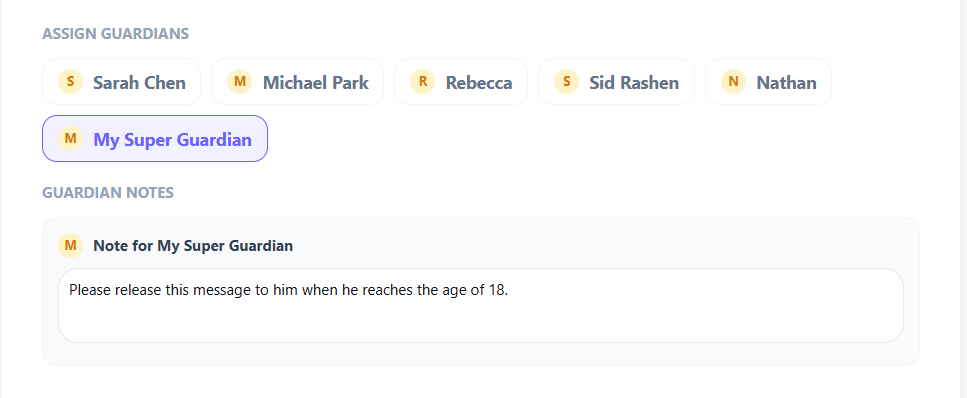
How to Assign a Guardian
Step 1: Open the Assign Guardians section. While composing a message, below the message body, you will find Assign Guardians, a list of the people in your account you can designate.
Step 2: Select who should hold this message. Tap the people you trust with it. You are not limited to one, a message can have more than one Guardian, which matters more than it might seem.
Step 3: Leave a note for them. The Guardian Notes field is where you write context for the Guardian, not for the recipient. This is where you describe what the message is for and how the Guardian will know it is time.
Why More Than One Guardian Matters
A single Guardian is a single point of failure. People move, lose access to accounts, or are themselves unavailable at the exact moment a message needs triggering, sometimes for the same reason the message exists in the first place. Assigning more than one trusted person to the same Timeless message means the message does not depend on one person’s circumstances staying constant for years or decades.
This is not about redundancy for its own sake. It is about making sure the message you cared enough to record does not quietly fail to arrive because the one person who knew about it was unreachable.
What the Guardian Permissions Actually Control
When you assign a Guardian, three separate permissions govern what they can do beyond triggering delivery, and each one is a deliberate choice you make, not a package deal.
Can add new recipients. Lets a Guardian add someone to receive the message who was not on the original list, useful when a message is meant for “the family,” and the exact list of who counts as family might grow.
Allow guardians to view content. Controls whether a Guardian can see what is actually inside the message before it is delivered. Worth turning on only when you specifically want a trusted person to review the content first, most messages do not need this.
Can add new guardians. This is not about adding more Guardians to build a bigger group. It lets a Guardian pass their role, and only the exact permissions they themselves were given, on to one other person, if they are ever unable to act. It is succession, not expansion.
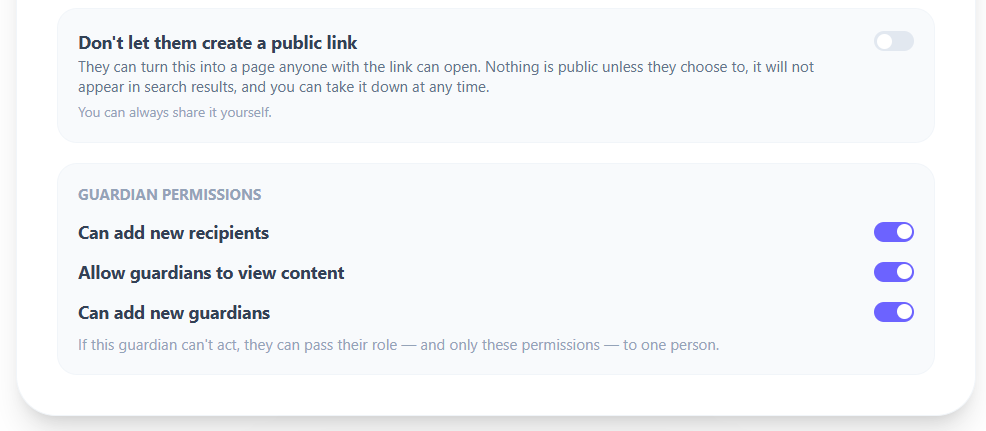
Think through each one individually rather than turning them all on out of convenience. Every permission you grant is something a Guardian can do beyond the one job the role actually requires, triggering the message at the right moment.
Who Actually Makes a Good Guardian
Not everyone close to you is the right choice. The person you want is not necessarily your closest relationship, it is the person most likely to still be reachable, level-headed, and paying attention when the moment actually comes, which is often years or decades from now.
A sibling who lives nearby and checks in regularly can be a better Guardian than a spouse who might, in the exact scenario the message is for, be too close to the situation to think clearly. Consider practical reliability alongside emotional closeness, the two do not always point to the same person.
What the Research Says About Naming a Trusted Decision-Maker in Advance
Karen Detering and colleagues, in a randomized controlled trial published in BMJ in 2010, studied the effects of advance care planning, formally naming a trusted person and documenting wishes ahead of a moment when you cannot act for yourself. Patients who completed this kind of planning were significantly more likely to have their wishes honored, and their families reported less anxiety, depression, and stress afterward, specifically because they were not left guessing at what the person would have wanted.
A Guardian works on the same underlying principle. Naming the person in advance, before the moment that requires them, removes the guesswork and the burden from whoever is left trying to figure out what you would have wanted done with a message you already knew exactly what to do with.
A Practical Example
A parent records a Timeless video for their children, meant to be delivered if they pass away before the children are grown. They assign both their sibling and their spouse as Guardians, so the message does not depend on either person alone being reachable at the right moment. In Guardian Notes, they write plainly what the video is, who it is for, and what should happen when the time comes. They leave Allow guardians to view content turned off for both, so either can trigger delivery, but neither can watch the video first.
Years later, if that moment arrives, it is not left to chance whether the right people know what to do. The plan was already made, by the one person who actually knew what the message was for.
You can assign your own Guardians for any message at messagefuture.com.
Some words are worth keeping for later.
MessageFuture lets you schedule letters, voice notes, and videos for the people you love, delivered exactly when the moment comes.
Start preserving your words →References
Ready to start? Record a message with no date set, release it yourself when the moment arrives, and nominate Guardians who can do it for you if you are not there. Create a free MessageFuture account.